How to Make a 365 Elevator AI Video: Walk-In, Glance, and the Stare
One person waits in the steel car. The other walks in, back first, and turns. A glance, then both stare into the lens. Seedream 5.0 locks the two adults. The canvas holds the strip lights. Seedance 2.5 only has to cross the walk-in.
TurnThe second person comes in back-first and turns.
GlanceA look, and one small hand move.
StareBoth face the lens. Mouths closed.
The pictures on this page are AI-generated. The two adults were made for this guide. They are not the people in the posts, and they are not public figures. This is a fictional elevator, not a filmed ride. VibePaper does not license “365” by Sampagne. The clip you export has no music. Add that official sound yourself in TikTok, Reels, or Shorts. If the app mutes it, pick the song from the app’s sounds. This page grants no music rights.
The clip people are posting is one locked phone shot in a brushed-steel elevator, under two bright white ceiling strip lights. Nobody cuts. Nobody zooms. One person is already inside. The second walks in, often back-first, turns, and the two of them share a small glance and a tiny pose. Then both look straight into the lens, expressionless. People also search it as 365 elevator trend, elevator 365 sampagne ai trend, 365 champagne elevator, unexpected duo elevator trend, and 365 sampagne edit. The song on the posts is “365” by the German artist Sampagne, also written sampagnebaby. Generate the picture here. Add that recording yourself when you post.
TrendTemplate’s check on 23 November 2026 lists 365 Elevator as number one and a new entry. It counted 41 different accounts posting an AI version in the 24 hours before that check, 128.3K views across those posts, a top AI version at 112.9K views, a 98 percent AI share over seven days, and a first-seen date of 2026-11-23. Remake the Trend, added 22 November 2026, counted 81 creators posting an AI version in the seven days to 23 November 2026. Those are two counters and two windows. This page keeps each figure with the site that published it.
The pages do not agree on a first day, so this guide does not invent one. TrendMeViral, updated 23 November 2026, says MakeViral published a template on 22 November 2026, and that the opened page says the format started 19 November 2026 with @neoausdermatrix33. Remake the Trend says sampagnebaby thanked fans on 15 November 2026, captioned “365 gehört uns”, at 94,000 plays, and that @neoausdermatrix33 had been cutting clips to the song since late October, one of them passing 1.1 million plays on 8 November. Remake says that account posted an elevator edit pairing two well-known rappers on 20 November, at 540,000 plays, and that CapCut templates opened the steel-lift format to two-photo uploads on 21 November, naming @bao268096, @heilly0146’s “unexpected duo 365 edit”, and @vibe0031. Do not rebuild those public-figure pairings. Use original adults, or photos you have the right to use.
The camera stays put. The joke is who walks in.
A lift, not a dance
Boom Clap is a night rooftop and a burst of confetti. Snowman Dance turns by a tree. Jingle Bell Brazil is a blue-lit line in Santa hats. This page is one steel car, two adults, and a stare. If the prompt adds snow, a stage, or a third person, you have left the trend.
Image to videoWhen the still should hold the room, and the prompt should hold only the move.
Seedance promptsHow a shot list keeps the same people through more than one beat.
Boom ClapA different locked phone shot, if the joke you wanted was confetti.
Two stills, one camera
Paper Gen, Image. The link sets Seedream 5.0. The image picker opens on Seedream 5.5, so if that is what you see, switch to Seedream 5.0 before you generate. Seedream 5.0 takes up to 14 reference images and outputs at 2K, 3K, or 4K, with 2K as the default. Draw the wait first. Attach it when you draw the stare. Set Aspect ratio to 9:16. First / last frame on Seedance 2.5 locks Aspect ratio to adaptive, so the stills have to be vertical already. The pictures here were generated for the guide. They are samples, not a promise about your next result.
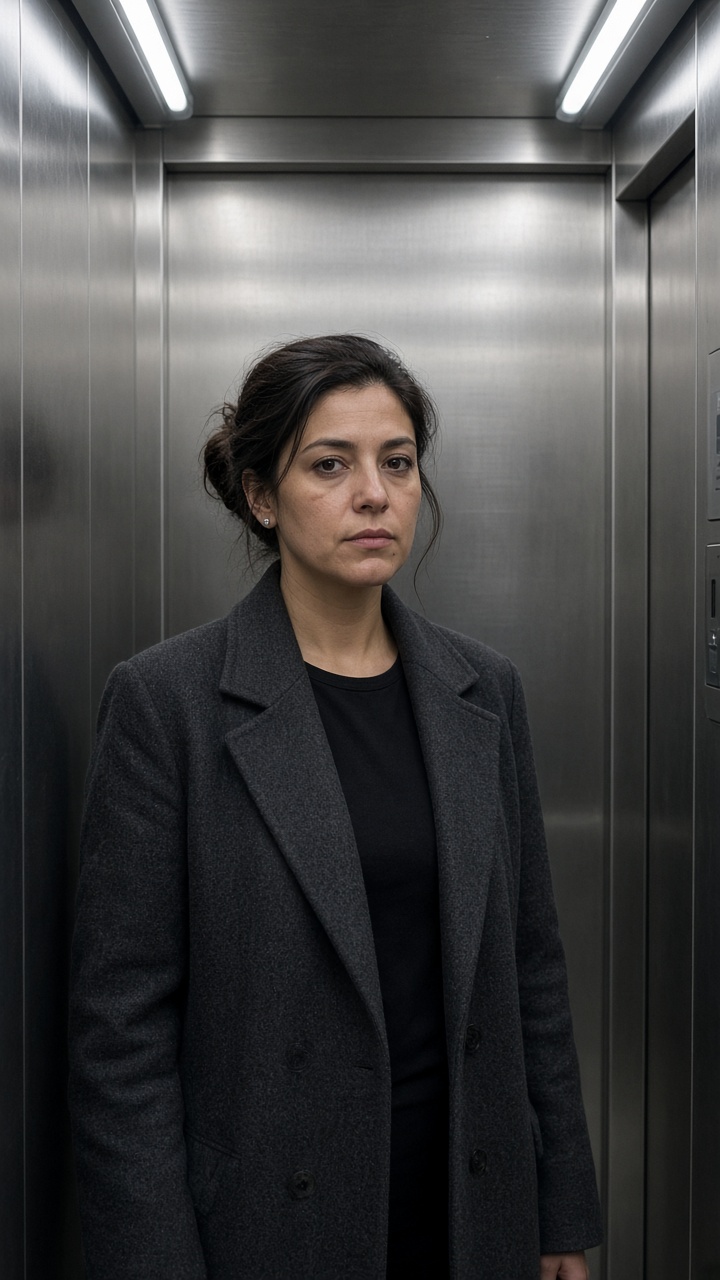
First The waitAI-generated
One original adult, alone, waist-up, under the two strip lights. This frame is the start of the walk-in.
Wait · Seedream 5.0
Vertical 9:16 photograph, waist-up, locked camera at chest height inside a small brushed stainless-steel elevator. Two long bright white fluorescent strip lights on the ceiling, cool even light, dull metal reflections, no neon, no daylight. One original adult woman in her early thirties stands alone, slightly left of center. Medium olive skin, dark brown hair in a low loose bun with a few flyaways, a faint mole at the right corner of her mouth, charcoal wool overcoat, black crew-neck, one small silver stud in the left ear. Calm, mouth closed, looking toward the lens, hands at her sides. Exactly one adult. No child, no second person, no logos, no floor numbers, no readable text, no watermark. Do not imitate a celebrity or a public figure. If a photo of an adult who agreed is attached, keep that face and that hair.
Paper Gen, Image. 9:16. Attach a photo only of an adult who agreed, or leave the slot empty and generate an original, as this page did.
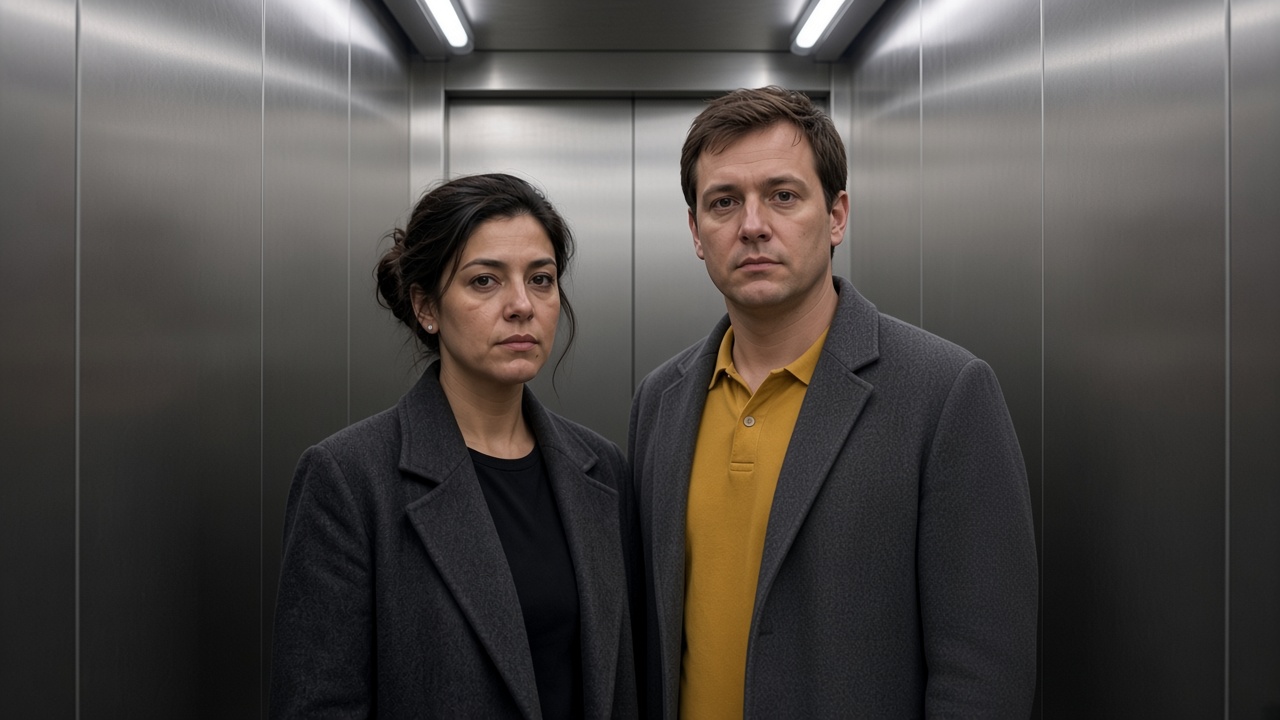
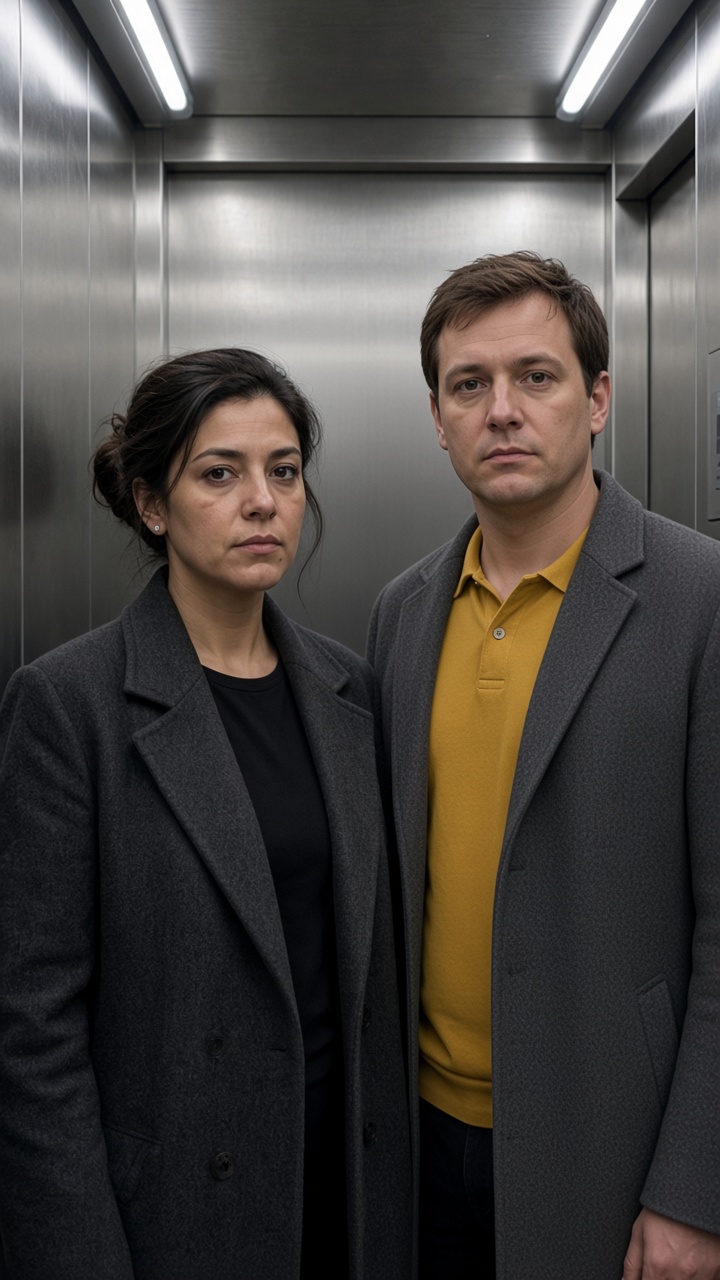
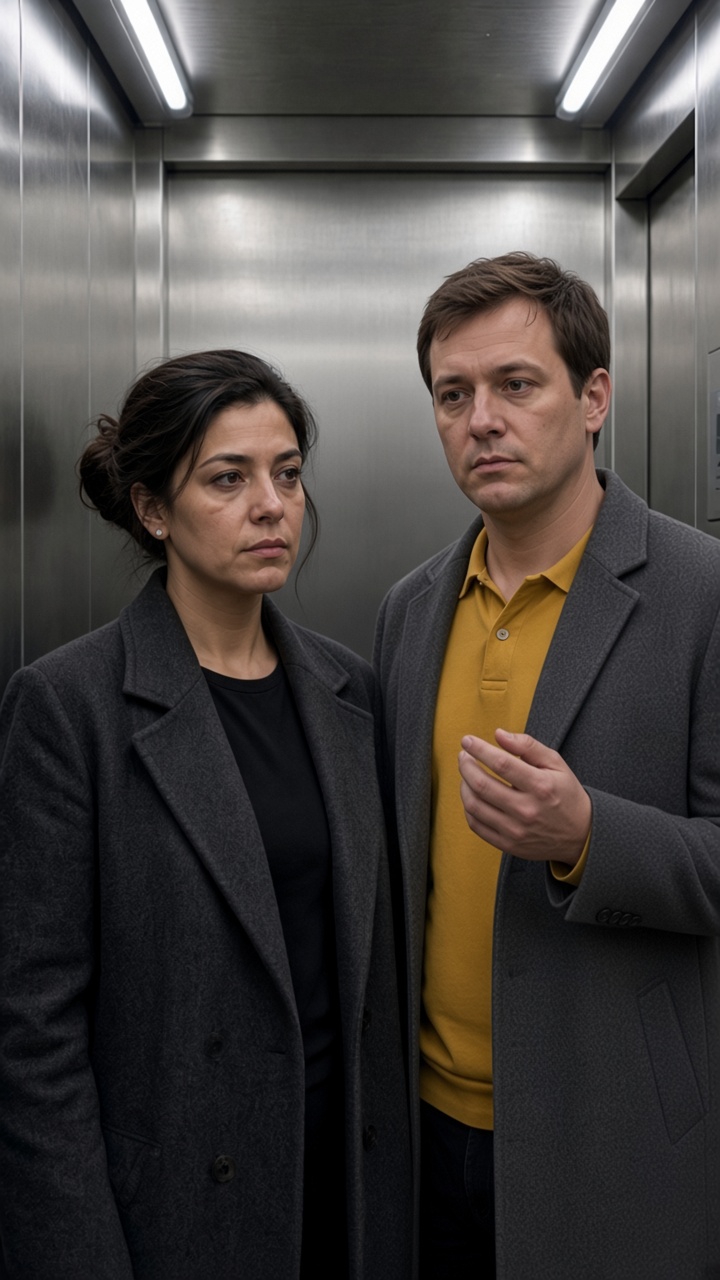
Both adults, same car, same clothes, same camera height. Mouths closed. This frame is where the clip lands.
Stare · Seedream 5.0
Vertical 9:16 photograph, the same brushed-steel elevator, the same two bright white ceiling strip lights, the same locked chest-height camera, cool even light. The same woman stands on the left: low bun, faint mole at the right corner of her mouth, charcoal wool overcoat, black crew-neck, silver stud. An original adult man stands on the right, late thirties, fair skin, short uneven sandy-brown hair with a small cowlick, no beard, mustard knit polo, open grey wool overcoat. Both look straight into the lens, mouths closed, expressionless. Hands down. Exactly two adults. No child, no third person, no logos, no readable text, no watermark. If earlier stills are attached, keep both faces and both outfits. Do not imitate a celebrity or a public figure.
9:16. Attach the wait still. If the coats or the lights drift, draw it again before you pay for motion.
You do not attach these to the one-shot. First / last frame takes two images, and those two are the wait and the stare. Draw the turn and the glance when the one-shot skips the walk-in, and use them as the split below. Count the fingers on the glance hand before you animate.
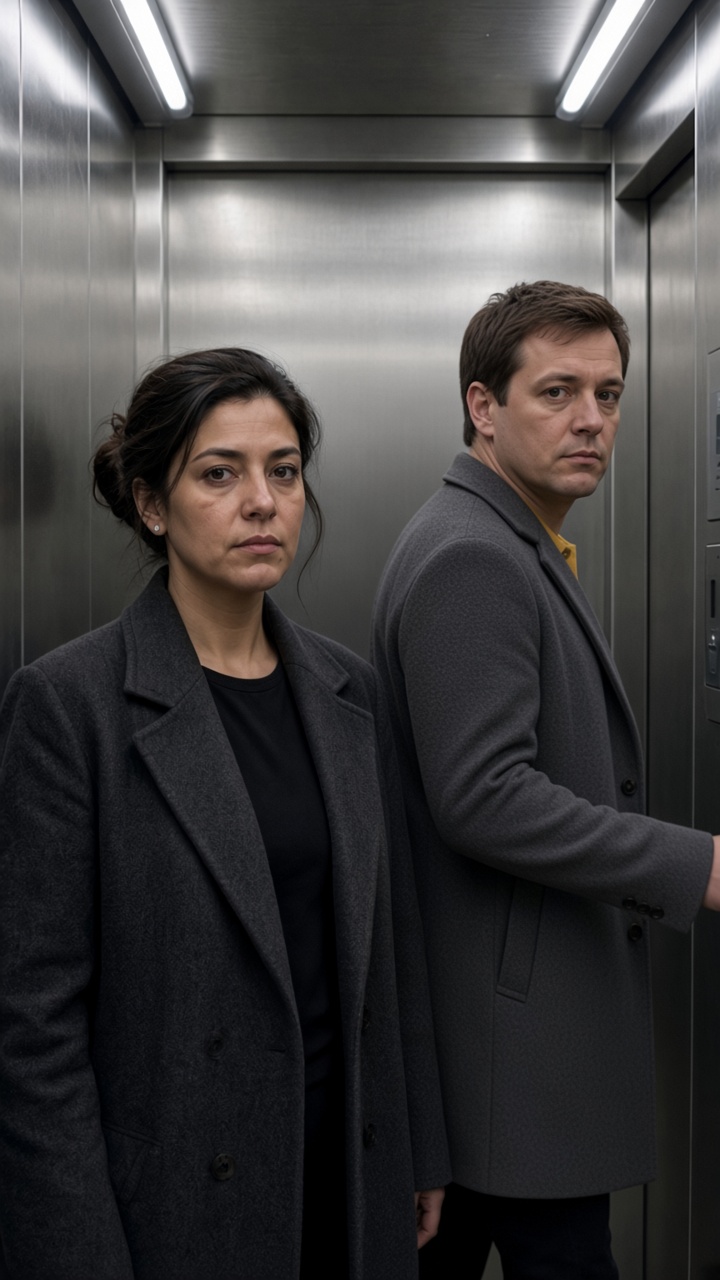
Turn The walk-inAI-generated
She is still waiting. He comes in back-first and is only halfway turned. Same steel, same lights.
Turn · Seedream 5.0
Vertical 9:16 photograph, the same elevator, the same two strip lights, the same locked camera. The same woman waits on the left, calm, looking toward the lens, same coat and bun. The same man is turning in from the right, mostly back and side to the camera, mustard knit and grey overcoat, one hand near the door, not yet standing still. Exactly two adults. No child, no logos, no readable text, no watermark. If the wait still is attached, keep her face and her coat. Do not imitate a celebrity.
Attach the wait still. This is a last frame for the first half, and a first frame for the second half.
A look toward each other, and one hand lifted a few centimetres. Not a wave, and not a dance.
Glance · Seedream 5.0
Vertical 9:16 photograph, the same elevator and strip lights, the same locked camera. The same two adults stand side by side in the same clothes. She glances a little toward him, mouth closed. He looks slightly toward her and lifts one hand a few centimetres, a small unfinished gesture, not a wave. Exactly two adults. Natural hands, five fingers each. No child, no logos, no readable text, no watermark. If the stare still is attached, keep both faces and both outfits.
Attach the stare still so the faces stay. If a hand has six fingers, redraw it. Do not put this still in the one-shot.
Paper Gen, Video. The link sets Seedance 2.5. The video picker opens on Vidu Q4 Preview, so switch to Seedance 2.5 if that is what you see. Choose First / last frame. Put the wait in the first slot and the stare in the last. That mode sets Aspect ratio to adaptive. Duration runs from 4 to 30 seconds and starts on Auto. Type 12. Twelve sits in the 10 to 14 second window people are posting. TrendMe describes its template as about 14 seconds. Twelve is a practical length, not a timing copied from a post. Resolution is 480p or 720p, and 720p is the default. Draft preview forces 480p. Sound defaults to on and writes the model’s own audio. Turn Sound off. That audio is not “365”, and it is not a license.
Walk-in · Seedance 2.5
One locked phone shot inside the same steel elevator. No cut, no zoom, no camera move. Start with the woman alone, calm, looking toward the lens. The man walks in from the right, back first, and turns to face the camera beside her. They trade a small glance. He makes one tiny hand move. Both then look straight into the lens and hold a deadpan stare, mouths closed. End on that stare. Exactly two adults. Natural hands. No extra limbs, no child, no third person, no readable words, no logo. Room tone only: a soft elevator hum. No music. Do not imitate a known song.
First frame: the wait. Last frame: the stare. Duration 12. Sound off. Do not also attach the turn or the glance.
Seedance 2.5 will not make a clip shorter than 4 seconds. If a third arm appears, or he is already standing still at the start, throw the pass out. Two shorter passes keep the door honest. Type 6, then 6. Six and six are practical, not a measured split from a post.
To the turn · Seedance 2.5
One locked phone shot. No cut, no zoom, no camera move. Start with the woman alone. The man walks in from the right, back first, and turns until he is beside her, not yet staring. End on that turn. Exactly two adults. Natural hands. No child, no readable words, no logo. Room tone only. No music.
First frame: the wait. Last frame: the turn. Duration 6. Sound off.
One locked phone shot. No cut, no zoom, no camera move. Start as he finishes the turn. They glance. One small hand move. Both then look straight into the lens and hold the deadpan stare. End on that stare. Exactly two adults. Natural hands. No child, no readable words, no logo. Room tone only. No music.
First frame: the turn. Last frame: the stare. Duration 6. The glance happens in this pass.
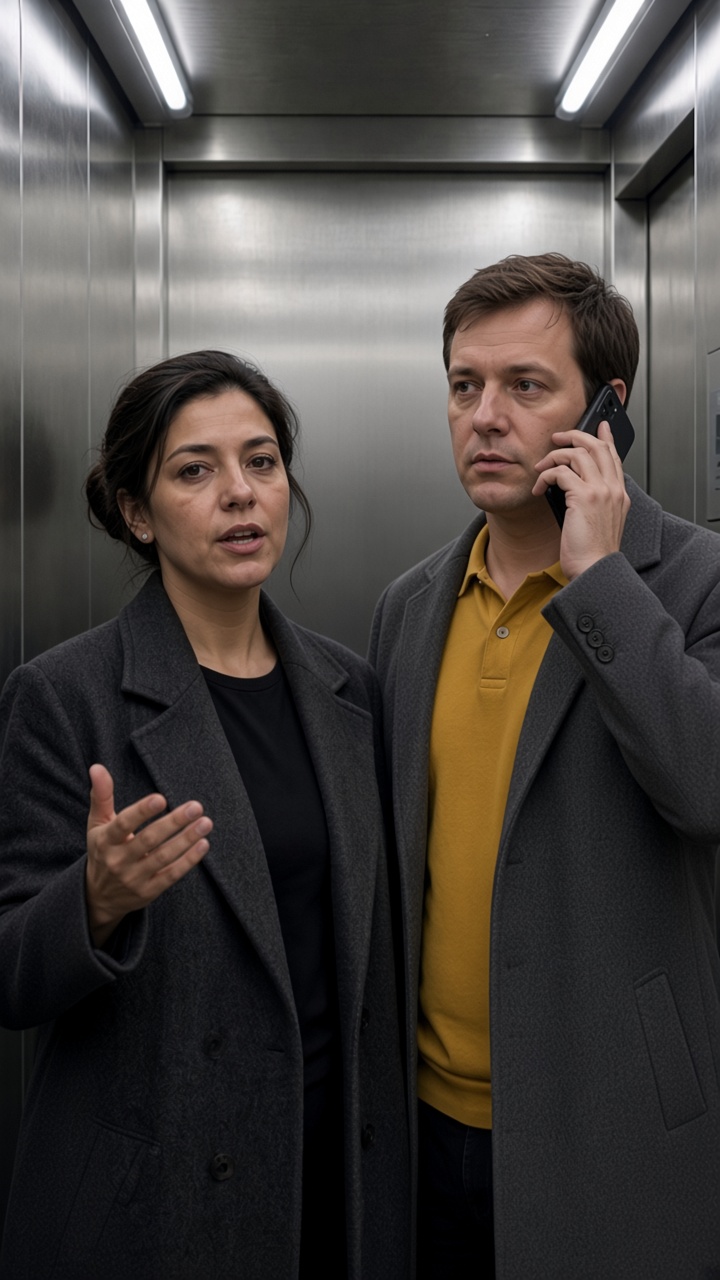
Some posts never show the walk-in. Remake the Trend describes that version as two people already in the car: one sings toward the camera with big hand gestures, the other puts a phone to an ear, checks the screen, glances over, and both end on the same deadpan stare. Remake’s own product for that version is 10 seconds. Draw a different first frame. The last frame can be the stare you already have. Do not ask the walk-in prompt to become this one.
Sing The phone and the gestureAI-generated
Already side by side. She is mid-gesture. He has a phone at his ear. Same car, same clothes, same lights.
Sing · Seedream 5.0
Vertical 9:16 photograph, the same elevator and strip lights, the same locked camera. The same two adults are already side by side in the same clothes. She faces the lens, mouth slightly open as if singing along, one hand raised in a loose mid-gesture, a normal hand. He holds a plain dark phone to his ear and looks slightly away. Exactly two adults. No child, no logos, no readable screen text, no watermark. If the stare still is attached, keep both faces and both outfits. Do not imitate a celebrity.
9:16. Attach the stare still. This is the first frame of the variant only.
One locked phone shot. No cut, no zoom, no camera move. They are already side by side in the steel elevator. She sings toward the lens with loose hand gestures. He puts a phone to his ear as if taking a call, lowers it, checks the screen, and glances at her. Both end looking straight into the lens, expressionless. Exactly two adults. Natural hands. No child, no readable words, no logo. Room tone only. No music. Do not imitate a known song.
First frame: the sing still. Last frame: the stare. Duration 10, to sit with the length Remake gives that version. Sound off.
The links fill the model and the prompt. They do not set Aspect ratio, Duration, the input mode, Sound, Draft preview, or a style. They do not upload a still. They do not spend credits and they do not press Generate. Paper Gen reads the prompt once, then removes it from the address bar. A link can hand over 2,000 characters.
01
Draw the wait.
Paper Gen, Image. The link sets Seedream 5.0. If the picker is on Seedream 5.5, switch. One original adult, or a photo of an adult who agreed. Hair, coat, and the stud have to survive every later still. “4 more like this” repeats the current prompt. Use it only when the face is already close.
02
Draw the stare at 9:16.
Attach the wait still. Same car, same strip lights, same clothes, a second original adult beside her, both looking into the lens. Resolution on Seedream 5.0 is 2K, 3K, or 4K. 2K is the default. This page does not quote a price.
03
Hold the steel on the canvas, or grade nothing.
Continue in Canvas and look at the frames together. Style lives in the style library and appends its own fragment when you submit. Paper Gen has no style chip. None of the presets is this elevator. Leave the library empty. If a still goes warm, or the lights move, redraw that still. Do not stack a style on top to cool it down.
04
Move the walk-in.
The video link sets Seedance 2.5. If Vidu Q4 Preview or another video model is selected, switch. First / last frame. Wait in the first slot, stare in the last, duration 12. Sound off. Read the estimate on Generate. Draft preview, if you use it, locks that pass to 480p.
05
Split only when the door fails.
Wait into the turn, duration 6. Turn into the stare, duration 6. Do not attach the glance still as a third image. This mode takes two.
06
Keep the sing-and-phone as its own take.
A new first frame, the stare as the last frame, duration 10. Replace the prompt if you used Make it a video. That control switches to video and, when the video prompt is empty, copies the still prompt. A still prompt describes a pose, not the walk-in. Switch the input mode to First / last frame yourself. The link does not do that switch.
07
Export, label it, and add the song outside.
Export 9:16. In the caption, say the picture is generated and that the ride is not a real filmed lift. VibePaper does not put “365” in the file. If you post it on TikTok, Reels, or Shorts, add the official sound there. If the app mutes it, pick the song from the app’s sounds. Do not paste a lyric into the prompt, and do not claim the file already contains the recording.
The grade is the light you already wrote: brushed steel, two hard white strips, cool and even, natural skin, no neon, no daylight. A preset that adds a second kind of light will flicker when the frames join. None of these is that car.
Empty
The recommendation. The prompt already names the metal and the strips. A preset on top of that is a second opinion about the lift.
Leave AI Real off
The fragment asks for soft cinematic light and a shallow background. The strips are hard and even. Soft light melts them.
Leave US Real off
The fragment asks for warm highlights. This car is cool. Warm steel is a different hour.
Leave these off too
Cyberpunk asks for neon rain. Suspense underexposes the car and turns the stare into a thriller. Western asks for golden-hour dust. Any one of them is a different room.
Whose face, and what you add when you post
Template sites ask for two photos and then put you on the trending sound. VibePaper can take a photo as a reference. That does not make every photo fair to use, and it does not put this recording in the generator.
Adults who agreed
Your own photo, or another adult who said yes. No children. Not a screenshot of a template. Not a frame from @neoausdermatrix33, @bao268096, @heilly0146, @vibe0031, or anyone else in the posts. If you have no photo you may use, generate original adults, as this page did.
No public figure
Do not attach a rapper, a singer, an official music-video still, or a celebrity lookalike. Do not put a celebrity name in the prompt. The unexpected pairing is the joke. It still has to be people you have the right to show. The result is a generated picture, and the caption has to say so.
The track stays outside
VibePaper does not license “365” and does not include it in the file. Do not upload the recording, do not ask the model to sing the lyric, and do not claim a license. Sound on Seedance 2.5 writes the model’s own audio. Turn it off. First / last frame does not take an audio file. Reference mode can take audio you have the right to use, between 2 and 30 seconds, and that is a different input mode. It is still not a way to drop the official sound into the generator. Add that sound after export, in the app where you post. If the app mutes it, pick the song from the app’s sounds.
Say it is AI
The caption can name the trend. It also has to say the picture is generated, and that this is a stylized elevator, not a clip from a real ride or of a person who did not agree.
Hold the stare. Leave the song for the post.
If the second person is already in the car at frame one, the walk-in is gone. Fix the wait still before you pay for the move. The cool strips are the grade. The recording on the posts is a step you take after export, and only in the app where you post.
Read on 24 November 2026. TrendTemplate, “TikTok AI trends this week”, data checked 23 November 2026, is the source for 365 Elevator at number one as a new entry, 41 different accounts posting an AI version in the 24 hours before that check, 128.3K views across those posts, a top AI version at 112.9K views, a 98 percent AI share over seven days, and a first-seen date of 2026-11-23. Remake the Trend, “365 Sampagne Elevator AI Trend”, added 22 November 2026, is the source for 81 creators posting an AI version in the seven days to 23 November 2026, for sampagnebaby’s thank-you on 15 November 2026 (“365 gehört uns”, 94,000 plays), for @neoausdermatrix33 cutting clips to the song since late October with one passing 1.1 million plays on 8 November, for that account’s elevator edit of two well-known rappers on 20 November at 540,000 plays, and for CapCut templates opening the steel lift to two-photo uploads on 21 November (@bao268096, @heilly0146’s “unexpected duo 365 edit”, @vibe0031). TrendMeViral, “365 Elevator Trend: What It Is and How to Make It”, updated 23 November 2026, is the source for the 14-second locked-camera walk-in, for MakeViral publishing a template on 22 November 2026, and for that opened page saying the format started 19 November 2026 with @neoausdermatrix33, with the song named as 365 by Sampagne. This page does not pick between 19 November and 20 November. The two adults in the pictures were generated for this guide.
No. It opens Paper Gen with Seedream 5.0 or Seedance 2.5 and the prompt filled in. It does not set the ratio, the duration, the input mode, Sound, or a style, and it does not press Generate. You spend credits only when you do.
Does the clip include 365?
No. VibePaper does not license the song and does not put it in the file. Turn Sound off. Add the official recording after export, in TikTok, Reels, or Shorts. If the app mutes it, pick the song from that app’s sounds. Do not paste the lyric into the prompt.
Can I use a celebrity or a child?
No. Only adults who agreed to appear. No children, no public figures, no official music-video stills, and no lookalikes. Generate original adults if you do not have a photo you may use.
How long should the clip be?
Type 12 for the walk-in. That sits in the 10 to 14 second window. TrendMe describes its template as about 14 seconds, so 14 is also a fair number to type. Type 10 for the side-by-side variant, because Remake describes that version as 10 seconds. Seedance 2.5 runs from 4 to 30 seconds. It will not go shorter than 4.
Is this a real elevator?
No. It is a fictional, stylized AI scene. Say that when you post, and say the picture is generated.