Kling 3.0AI video generator with sound
Up to 15 seconds, cut into the shots you write, with speech, footsteps and ambience made in the same pass. Start from a prompt or from two frames.
No watermark. You see the price before you generate.
What it does
Kling 3.0 features: shots you direct, sound that comes with them

Five shots, one cast, cut where you wrote it
A shiba grabs a bread roll and the baker runs after it down a snowy street. Write each shot with its seconds, in order, and Kling 3.0 cuts between them: in this 15 second take the cuts land at 3, 6, 10 and 13 seconds. The same dog and the same baker in the burgundy beanie carry through all five shots.

A voice in the scene, snow you can hear
A traveler films herself on a snowy night and says her line to the camera. Kling 3.0 generates the voice, the crunch of snow and the crowd far off with the picture, so the words land on the lips. Write each line with a name, a tone and a language. Kling lists Chinese, English, Japanese, Korean and Spanish.
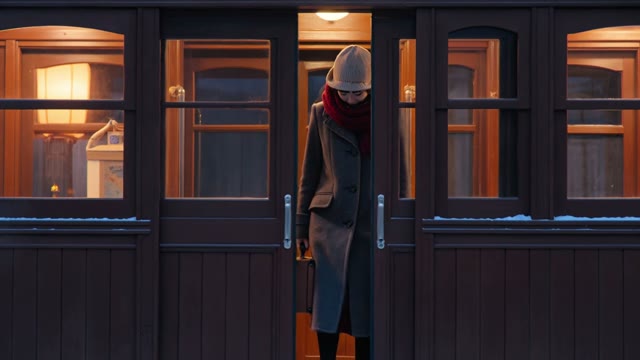
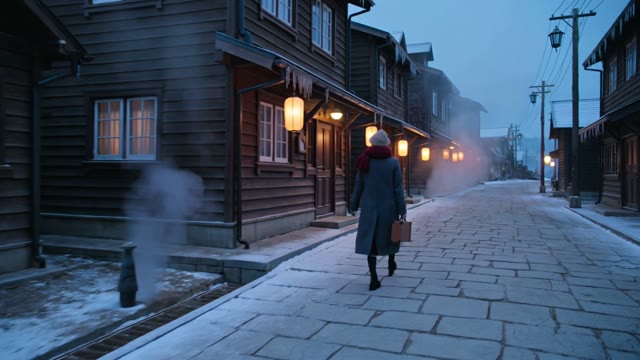
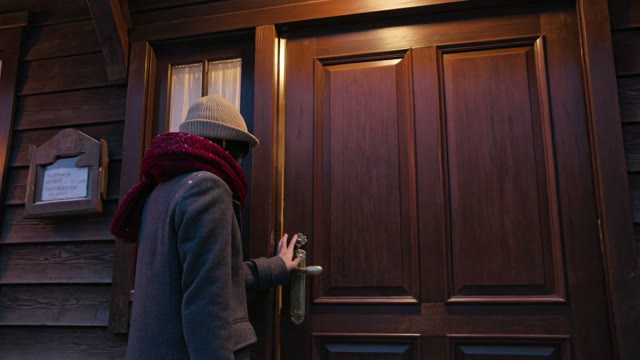
A whole arrival in four shots
Shot 1 the train pulls in, shot 2 she steps down, shot 3 the steaming street, shot 4 the inn door. Each shot is written with its seconds and the seconds add up to 15, so the cuts fall at 4, 8 and 12 seconds. Use the same words for her coat, scarf and hat in every shot so she stays the same person.
Start generating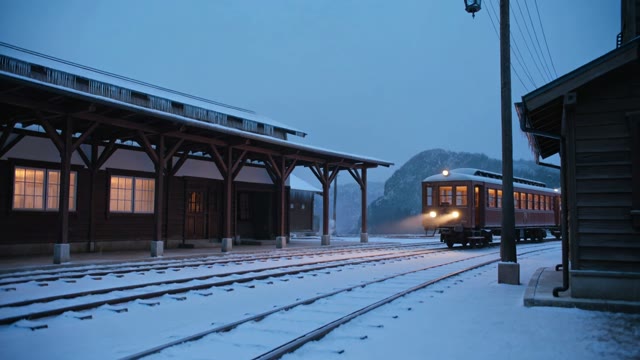
Built for
Kling 3.0 for ads, stories and social video

Product and craft. A pour into a white cup, a snowflake on the tea, then a slow pull back to the lantern in the window. Three shots in ten seconds, with the pour on the track.
- Developer
- Kuaishou
- Length
- 3 to 15 seconds per generation
- Quality
- 720p standard, 1080p pro or 4K
- Start from
- A text prompt, or a first and last frame
- Shots
- Up to 6 per generation, each written with its own seconds
- Sound
- Speech, effects and music generated with the picture. Can be turned off
- Aspect ratio
- 1:1, 9:16 or 16:9
- Where to use it
- Paper Gen and the canvas in VibePaper
Made with Kling 3.0
Start generating

Kling 3.0 questions: shots, sound, frames and quality
What is Kling 3.0?
Kling 3.0 is a video model from Kuaishou. It generates 3 to 15 seconds of video with sound in one pass, from a text prompt or a first and last frame, and it can cut between several shots written into the prompt. In VibePaper it runs in Paper Gen and on the canvas, where it is listed as Kling V3.
How long can a video be, and at what quality?
Each generation runs 3 to 15 seconds at 720p standard, 1080p pro or 4K. Try a take at 720p standard to save credits, then generate the one you like at a higher tier. The first clip on this page is 1080p pro and the rest are 720p standard.
Does Kling 3.0 generate sound?
Yes. Speech, ambience, effects and music are generated with the picture. The sound switch is on by default and can be turned off. Write each spoken line as a name, a tone and a language, and give each speaker a steady label. Kling lists Chinese, English, Japanese, Korean and Spanish, and a scene can switch between them.
Can it cut between several shots?
Yes. Write the shots as shot 1, shot 2 and shot 3 with the seconds of each, and make the seconds add up to the length you set. Kling allows up to 6 shots in one generation. In our 15 second test with 5 shots, the cuts landed at 3, 6, 10 and 13 seconds, within half a second of what we wrote. Leave the shot list out and you get one continuous take.
Can I use a first and last frame?
Yes. Add one image as the first frame and one as the last, and describe the move between them in the prompt. Describe the action and the camera, not the picture you already gave it.
Can I add reference images, a reference video or extend a clip?
Not with this model. Kling 3.0 here starts from a prompt or a first and last frame. For reference images or a reference video, use Kling 3.0 Omni. For up to 9 images, 3 videos and 3 audio clips as references, use Seedance 2.0.
Can I tell it what to leave out?
There is no negative prompt field, so say what you want instead of what to avoid. Ask for plain paper lanterns rather than a lantern with no writing, and for a clear sky rather than no clouds.
Which aspect ratios does it support?
1:1, 9:16 and 16:9, so one model covers vertical social video, square posts and widescreen.
Why was my prompt refused?
Prompts that name a known film, song, artwork or real person can be refused. Describe original characters and places in your own words instead.
Can I use the videos commercially?
Yes. Videos download without a watermark, and you can use them in ads, client work and social channels. You are responsible for any images you upload as first or last frames.
Guides and Model Briefs from Our Blog
Practical guides and plain-language briefs on the models you can use here: what each one is good at, how to prompt it, and how to get a better result on the canvas.